Although I've used database table indexes for eons, and understand how and when to use them, I recently had a real computer science-y aha! moment that gave me a new appreciation for indexes.
I was re-reading Kochan's Programming in C, and wrote a little program to calculate binary search worst scenario step counts for collections of various sizes. So, for instance, given a collection of N sorted linked list items, empirically calculate the maximum number of steps needed to search the list to find an arbitrarily selected item.
I was floored when I saw that binary searching can find an item in a collection as large as one million items in 21 steps or less! I have a newfound appreciation for how much more desirable index seeks are in comparison to (sequential) table scans!
In computer science lingo, the worst case binary search has a time complexity of O(log n) which means the worst case scales up as the log of the collection size. This is a good thing since the log of a number x increases much slower than x increases. O(log n) time vs. O(n) time (a.k.a. linear time). The output of the program (shown below) below clearly shows this to be the case.
#include <stdio.h>
#include <math.h>
/*
Calculate binary search worst case step counts for a range of collection
sizes and compare to worst case step counts with log2(collection size).
Do this for a wide range of node sizes. It's remarkable that in only 21
steps (or fewer, obviously), any entry can be found in a collection of a
million sorted items. Especially compared to a sequential search of the
entire collection.
*/
unsigned long int worst_case(unsigned long int collectionSize)
{
/*
This pretends to step through a binary search process that assumes
the target item is the last item in the collection which requires
the maximum number of steps. Binary search starts with an upper and
lower bound and sees if the target item is above or below the midpoint
and adjusts the lower and upper bounds of the search's next step to
be the half of the distribution containing the target item. Halving
of the next step's search area continues until the item is found or
the item is determined not to be present in the collection. Again, this
does not actually do a binary search, it just counts the number of steps
required to actually do one.
*/
unsigned long int low=0;
unsigned long int high=collectionSize-1;
unsigned long int mid;
unsigned long int steps=0;
unsigned long int target=collectionSize-1; //Last number in virtual collection
while(low<=high)
{
mid=(low+high)/2; //Midpoint of current range of focus
steps++;
if (mid==target)
break; //Simulates item found, so exit loop
else if (target<mid) //Simulates target is in lower half of range
high=mid;
else //Target>mid -- Simulates target is in upper half of range
low=mid+1;
}
return steps;
}
int main()
{
unsigned long int maxCollectionSize = pow(2,24);
int i;
unsigned long int collectionSize;
float log2ofSize;
unsigned long int wc;
printf("Collection Size Worse Case Log2(Collection Size)\n");
printf("--------------- ---------- ---------------------\n");
for(i=0; pow(2,i)<=maxCollectionSize; i++)
{
collectionSize=pow(2,i);
log2ofSize = log2(collectionSize);
wc = worst_case(collectionSize);
printf("%15i %10i %21.2f\n", collectionSize, wc, log2ofSize);
}
return 0;
}
/*
Output:
Collection Size Worse Case Log2(Collection Size)
--------------- ---------- ---------------------
1 1 0.00
2 2 1.00
4 3 2.00
8 4 3.00
16 5 4.00
32 6 5.00
64 7 6.00
128 8 7.00
256 9 8.00
512 10 9.00
1024 11 10.00
2048 12 11.00
4096 13 12.00
8192 14 13.00
16384 15 14.00
32768 16 15.00
65536 17 16.00
131072 18 17.00
262144 19 18.00
524288 20 19.00
1048576 21 20.00
2097152 22 21.00
4194304 23 22.00
8388608 24 23.00
16777216 25 24.00
*/
Wednesday, July 24, 2013

Monday, July 8, 2013
Turn off ERRORABEND for an optional, potentially unstable part of a SAS program
Usually I want my production SAS processes to terminate immediately when they encounter an unhandled error. This is to prevent corrupting existing data structures with bad updates and the like. To this end, I set the ERRORABEND option at the beginning of these programs since it will abend/terminate a program when an error occurs.
Some of my programs %INCLUDE code downloaded from a live FTP site. I always want the latest code or I could cache a local copy. Unfortunately the FTP site is sometimes unexpectedly down for maintenance when my program calls out to it and causes an error. Given that I have ERRORABEND set, this crashes the program run before it even really gets going. I decided that the FTP-related code is not absolutely essential for a successful program run, so I needed a way to keep going through the rest of the program even if the FTP part fails.
The approach I've taken to "ignore" an FTP-related error is to set the NOERRORABEND system option right before the FTP download and then set it back to ERRORABEND (or whatever it was set to) right after the FTP code gets executed.
The key part is the DICTIONARY.OPTIONS table that stores current option settings. You can think of this table as storing a list of key-value pairs, with the key being the option name and the value being the option's current setting. The key variable is called OPTNAME and the value variable is called SETTING.
Here's a sample of what you might find in the table.
proc sql;
select optname, setting
from dictionary.options
where upcase(optname) like 'ER%';
quit;
Option Name Option Setting
--------------------------------------
ERRORABEND NOERRORABEND
ERRORBYABEND NOERRORBYABEND
ERRORCHECK NORMAL
ERRORS 20
*Capture current ERRORABEND setting in a macro var;
proc sql noprint;
select setting into :errorabend_setting
from dictionary.options
where upcase(optname)='ERRORABEND';
quit;
*Turn off errorabend with NOERRORABEND setting;
options NOERRORABEND;
*Download and run the code file hosted on FTP;
filename runme ftp "file_to_download.sas"
host = "made_up_domain_name.org"
cd = "/formatcode"
pass = "secret"
user = "myloginname";
%include runme;
*Return errorabend setting to what it was prior to the FTP steps;
options &errorabend_setting;
A google search for "%opt2mvar" illustrates how this functionality can be packaged up in to a reusable macro.
Some of my programs %INCLUDE code downloaded from a live FTP site. I always want the latest code or I could cache a local copy. Unfortunately the FTP site is sometimes unexpectedly down for maintenance when my program calls out to it and causes an error. Given that I have ERRORABEND set, this crashes the program run before it even really gets going. I decided that the FTP-related code is not absolutely essential for a successful program run, so I needed a way to keep going through the rest of the program even if the FTP part fails.
The approach I've taken to "ignore" an FTP-related error is to set the NOERRORABEND system option right before the FTP download and then set it back to ERRORABEND (or whatever it was set to) right after the FTP code gets executed.
The key part is the DICTIONARY.OPTIONS table that stores current option settings. You can think of this table as storing a list of key-value pairs, with the key being the option name and the value being the option's current setting. The key variable is called OPTNAME and the value variable is called SETTING.
Here's a sample of what you might find in the table.
proc sql;
select optname, setting
from dictionary.options
where upcase(optname) like 'ER%';
quit;
Option Name Option Setting
--------------------------------------
ERRORABEND NOERRORABEND
ERRORBYABEND NOERRORBYABEND
ERRORCHECK NORMAL
ERRORS 20
From this, you can tell my current setting for ERRORABEND is NOERRORABEND.
The unstable FTP handling code uses this information and executes the following steps: (1) grab the current value of the ERRORABEND option from DICTIONARY.OPTIONS, (2) stash the value in a macro variable for later use, (3) set the NOERRORABEND option, (4) run the FTP-related code, and (5) revert back to whatever (NO)ERRORABEND setting was in force before (the value stored in the macro variable during step 1). Here is the code.
proc sql noprint;
select setting into :errorabend_setting
from dictionary.options
where upcase(optname)='ERRORABEND';
quit;
*Turn off errorabend with NOERRORABEND setting;
options NOERRORABEND;
*Download and run the code file hosted on FTP;
filename runme ftp "file_to_download.sas"
host = "made_up_domain_name.org"
cd = "/formatcode"
pass = "secret"
user = "myloginname";
%include runme;
*Return errorabend setting to what it was prior to the FTP steps;
options &errorabend_setting;
A google search for "%opt2mvar" illustrates how this functionality can be packaged up in to a reusable macro.
Monday, November 12, 2012
SAS options varlenchk=
How many times have you seen this warning in SAS?
This can become a common warning when you're manipulating SAS datasets and resizing variables, for example, to meet data dictionary specifications. In general, you want to know about possible data truncation, but there are occasions when you know what the data look like and you purposefully want to shrink the length of a variable. For example, let's say you get a feed from another database system and the length of the variable in question is char(100). You know that the max length of data is char(20), so you want to shrink the data to size char(30). The name of the input dataset is called source_data.
By itself, this will generate the warning, however if you surround the data step with options like this, the resizing warning will be suppressed and your SAS log will be kept clear of false warnings.
WARNING: Multiple lengths were specified for the variable {VARNAME} by input data
set(s). This may cause truncation of data.
This can become a common warning when you're manipulating SAS datasets and resizing variables, for example, to meet data dictionary specifications. In general, you want to know about possible data truncation, but there are occasions when you know what the data look like and you purposefully want to shrink the length of a variable. For example, let's say you get a feed from another database system and the length of the variable in question is char(100). You know that the max length of data is char(20), so you want to shrink the data to size char(30). The name of the input dataset is called source_data.
data my_data;
    length text_field $30.; *char(100) in source_data dataset;
    set source_data;
run;
By itself, this will generate the warning, however if you surround the data step with options like this, the resizing warning will be suppressed and your SAS log will be kept clear of false warnings.
options varlenchk=nowarn; *temporarily turn off variable length checking since purposefully resizing vars;
data my_data;
    length text_field $30.; *char(100) in source_data dataset;
    set source_data;
run;
options varlenchk=warn; *turn variable length checking back on;
Wednesday, August 8, 2012
C# Extension Method to Reverse a String
Someone recently asked me to write some quick code to writing a reversed string to the console. What I came up with at the time was this:
string s = "abcdefg";
foreach (char c in s.Reverse())
Console.Write(c);
The string class has a Reverse method on it already, but it returns an IEnumerable, not the reversed string.
After the fact, I looked at other ways of doing it and figured out a one-liner:
Console.WriteLine(String.Join("", s.ToCharArray().Reverse<char>()));
Going a step further (since I wanted to experiment a little with extension methods), I wrote this little string class extension method to encapsulate that functionality as follows:
public static class StringExtensions{
public static string ReverseString(this string s)
{
return String.Join("", s.ToCharArray().Reverse<char>());
}
}
Now I can simply write:
string s = "abcdefg";
Console.WriteLine(s.ReverseString());
The whole console program is as follows:
using System;
using System.Linq;
namespace ConsoleApplication1
{
public static class StringExtensions
{
public static string ReverseString(this string s)
{
return String.Join("", s.ToCharArray().Reverse<char>());
}
}
class Program
{
static void Main(string[] args)
{
string s = "abcdefg";
Console.WriteLine(s.ReverseString());
Console.ReadLine();
}
}
}
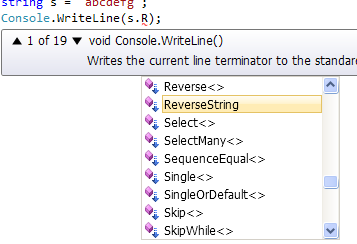
And since ReverseString is a an extension method extending the Framework string class, it shows up in intellisense like this as if it were a static method on the string class itself. The down arrow indicates it's an extension method (among many already defined on string).
string s = "abcdefg";
foreach (char c in s.Reverse())
Console.Write(c);
The string class has a Reverse method on it already, but it returns an IEnumerable, not the reversed string.
After the fact, I looked at other ways of doing it and figured out a one-liner:
Console.WriteLine(String.Join("", s.ToCharArray().Reverse<char>()));
Going a step further (since I wanted to experiment a little with extension methods), I wrote this little string class extension method to encapsulate that functionality as follows:
public static class StringExtensions{
public static string ReverseString(this string s)
{
return String.Join("", s.ToCharArray().Reverse<char>());
}
}
Now I can simply write:
string s = "abcdefg";
Console.WriteLine(s.ReverseString());
The whole console program is as follows:
using System;
using System.Linq;
namespace ConsoleApplication1
{
public static class StringExtensions
{
public static string ReverseString(this string s)
{
return String.Join("", s.ToCharArray().Reverse<char>());
}
}
class Program
{
static void Main(string[] args)
{
string s = "abcdefg";
Console.WriteLine(s.ReverseString());
Console.ReadLine();
}
}
}
And since ReverseString is a an extension method extending the Framework string class, it shows up in intellisense like this as if it were a static method on the string class itself. The down arrow indicates it's an extension method (among many already defined on string).
Tuesday, July 17, 2012
Date and Datetime Stamps in SAS, Perl, C#, and VB.NET
When repeating periodic tasks (hourly, daily, monthly, or whatever), it's often useful to date or datetime stamp the data files or log coming out of the process. Here is simple code that I use to generate date and datetime stamps in various languages that I use regularly: SAS, Perl, C#, and VB.NET.
I prefer stamps in yyyymmdd and yyyymmdd_hhmmss formats (yyyy=4-digit year, mm=2-digit month, dd=2-digit day, hh=hour on 24-hour clock, mm=minute, ss=second) since these are readily sortable in chronological order.
SAS
Log says...
Obviously bundling that code up in a couple of macros (%datestamp and %datetimestamp) is the way to go.
Perl
Output...
C#
Output...
VB.NET
Output...
I prefer stamps in yyyymmdd and yyyymmdd_hhmmss formats (yyyy=4-digit year, mm=2-digit month, dd=2-digit day, hh=hour on 24-hour clock, mm=minute, ss=second) since these are readily sortable in chronological order.
SAS
*Create a picture format for making datetime stamps;
proc format;
    picture dtstamp low-high='%Y%0m%d_%0H%0M%0S'
                    (datatype=datetime);
run;

*Create a date and a datetime stamp macro variable;
data _null_;
    *Use built in yyyymmdd format;
    call symput('datestamp',put(date(),yymmddn8.));
    *Use custom picture format;
    call symput('datetimestamp',compress(put(datetime(),dtstamp.)));
run;

%put FYI: datestamp=&datestamp;
%put FYI: datetimestamp=&datetimestamp;

*Sample usage;
data daily_extract_&datestamp;
    *blah blah blah;
run;
data hourly_extract_&datetimestamp;
    *blah blah blah;
run;
Log says...
FYI: datestamp=20120717
FYI: datetimestamp=20120717_103230

NOTE: The data set WORK.DAILY_EXTRACT_20120717 has 1 observations and 0 variables.
NOTE: The data set WORK.HOURLY_EXTRACT_20120717_103230 has 1 observations and 0 variables.
Obviously bundling that code up in a couple of macros (%datestamp and %datetimestamp) is the way to go.
Perl
use POSIX qw(strftime);
my $datestamp = strftime("%Y%m%d", localtime);
my $datetimestamp = strftime("%Y%m%d_%H%M%S", localtime);
print "FYI: datestamp=$datestamp\n";
print "FYI: datetimestamp=$datetimestamp\n";
Output...
FYI: datestamp=20120717
FYI: datetimestamp=20120717_103230
C#
string datestamp = DateTime.Now.ToString("yyyyMMdd");
string datetimestamp = DateTime.Now.ToString("yyyyMMdd_HHmmss");
Console.WriteLine("FYI: datestamp={0}", datestamp);
Console.WriteLine("FYI: datetimestamp={0}", datetimestamp);
Output...
FYI: datestamp=20120717
FYI: datetimestamp=20120717_103230
VB.NET
Dim datestamp As String = DateTime.Now.ToString("yyyyMMdd")
Dim datetimestamp As String = DateTime.Now.ToString("yyyyMMdd_HHmmss")
Console.WriteLine("FYI: datestamp={0}", datestamp)
Console.WriteLine("FYI: datetimestamp={0}", datetimestamp)
Output...
FYI: datestamp=20120717
FYI: datetimestamp=20120717_103230
Friday, June 1, 2012
Scheduling SAS Program Runs on UNIX
Introduction
Scheduling SAS programs to run on a UNIX system can be accomplished in a number of ways. I developed a Perl script to manage the process of running SAS code, parsing the SAS log, and emailing the results. Instead of scheduling the SAS executable to run directly, I schedule the Perl script and it takes care of the rest. Specifically, it does the following:
- It checks to make sure that the SAS .sas program file that you want to run actually exists,
- It runs the SAS program in batch mode and creates datetime-stamped .log and .lst files in the same directory as the .sas file,
- It checks the SAS log file for errors, warnings, uninitialized variable messages, and to see if the program ran all the way to the end, and
- It sends an email reporting what happened, along with attached copies of the .log file and the .lst files.
The three ingredients of the solution are:
- A .sas program (tweaked very slightly),
- The Perl script called runsas.run, and
- The crontab UNIX scheduling utility.
Ingredient #1: The .sas Program File
Assuming you have a UNIX .sas program file in hand, add the following line to the very end of it.
data test
do x = 1 to 10;
output;
end;
run;
*make a dataset that counts from 1 to 10;
data test
do x = 1 to 10;
output;
end;
run;
%put FINISHED;
Ingredient #2: runsas.run
I wrote the runsas.run Perl script to coordinate the SAS program execution, log parsing, and emailing process. The full text of the script is at the end of this post. I'm going to assume that you have the code of runsas.run (copied from the end of this post) saved in a text file named runsas.run stored in your home directory (i.e., ~/runsas.run) and that you have granted execution rights on that file by running chmod +x ~/runsas.run.
- The fully specified name of the program (including which directory it's in -- and P.S. please do NOT have spaces in the directory or file names!) and
- your email address (or comma-delimited list of email addresses -- with no spaces).
Here's what runsas.run does:
- It ensures that the program exists,
- It runs the SAS program in batch mode and creates datetime stamped .log and .lst files in the same directory as the .sas file,
- It checks the SAS log file for errors, warnings, uninitialized variable messages, and to see if the program ran all the way to the end, and
- It sends an email to the provided email address indicating how the program ran, along with a attached copies of the .log file and the .lst file (if a lst was produced by SAS).
Ingredient #3: crontab
Crontab is the built-in UNIX job scheduling utility. There are numerous websites devoted to it such as http://crontab.org/ and http://www.adminschoice.com/crontab-quick-reference. Do a web search for "crontab reference" to find others if you wish to learn more beyond what will be explained here.

Getting Results
After runsas.run runs, you should get an email. The subject line indicates if the program had warnings, errors, etc. and the contents of the email summarizes that information. Any errors, etc. that occur are included in the email and the .log and .lst file (if there is one) are attached. Warnings considered to be "false alarms" are listed in the "Ignored error/warning lines" section of the email. The original .log and .lst files are on UNIX in the SAS program directory. The datetime stamp (with time measured on a 24-hour clock) prevents reruns from overwriting prior .log and .lst files. If your program works, but you forgot to put in the %put FINISHED; line at the end, the email will say so as well. And if your program runs with errors, warnings, and/or uninitialized variables notes, the email will tell you what the errors, etc. were.
Full Text of runsas.run
#!/usr/bin/perl
use strict;
use warnings;
use lib "~/perl/lib"; #Custom add-on libs (contains MIME::Lite)
use MIME::Lite; #Email module found in custom add-on lib/MIME

#See http://search.cpan.org/~rjbs/MIME-Lite-3.028/lib/MIME/Lite.pm

use POSIX qw(strftime); #POSIX strftime format returns time formatted as a string
####################################################################################################
# Purpose: this perl script requires one command line parameter that is the name of the SAS program
#          (.sas filename extension not required and path of program should not be included) that
#          should be executed.  A notification email is sent with feedback on how the SAS program
#          performed once the program has finished.
#####################################################################################################

my $num_args = $#ARGV + 1; #Get # command line parameters into a var

if ($num_args == 2) { #Make sure that 2 command line arguments provided.

    my $start_time = time; #Record the current time (time this process started)
    my $datetimestamp = strftime "%Y%m%d_%H%M%S", localtime; #Create datetime stamp string

    #The first command line argument is the name of the SAS program to be executed
    my $sas_prog_file = $ARGV[0]; #Put first command line arg into a variable
    chomp($sas_prog_file); #Trim trailing spaces
    unless (-e $sas_prog_file) { die "SAS program ($sas_prog_file) does not exist!"; } #Make sure program exists
    $sas_prog_file =~ /^(.+\/)(\S+)(\.sas)$/i; #Match with 3-part regex: 1=path, 2=program name (w/o extension), 3=filename extension
    my $prog_path = $1; #First part is the program path
    my $prog_title = $2; #Second part is the program file title, last part is filename extension which isn't used

    #The second command line argument is the email address(es) to whom notification should be sent
    my $email_recipient = $ARGV[1]; #Put second command line arg into a local variable
    chomp($email_recipient); #Trim trailing spaces

    #Start a string that will contain notes about how the process went (process log) and will get
    #sent as the body of the notification email
    my $notes = sprintf "Start time: %s\n", scalar(localtime($start_time)); #Put start time first in the notes

    #Derive names of datetime-stamped SAS log and lst files from the SAS program file path and title
    my $sas_log_file = "$prog_path$prog_title.$datetimestamp.log";
    #chomp($sas_log_file); #Necessary for some reason to remove newline character
    my $sas_lst_file = "$prog_path$prog_title.$datetimestamp.lst";
    #chomp($sas_lst_file); #Necessary for some reason to remove newline character

    my $sas_exe = "/bin/sas/sas"; #Physical location of the SAS execution script/file (customize for your box)

    my $command_line = "$sas_exe -RSASUSER -noterminal -sysin $sas_prog_file -log $sas_log_file -print $sas_lst_file"; #Complete batch SAS command

    #Shell out and run sas synchronously with nohup (no hangups) command and > /dev/null to suppresses stdout feedback on the command line
    system("nohup $command_line > /dev/null");

    #Now that SAS finished running, check the results by parsing the SAS log file.
    #Error, warning, uninitialized variables, ignored errors/warnings, and presence of finish flag will be tracked
    my @error_lines = (); #Array of SAS log error lines
    my @warning_lines = (); #Array of SAS log warning lines
    my @uninit_lines = (); #Array of SAS log uninitialized variables lines
    my @ignored_lines = (); #Array of SAS log error/warning lines that are being ignored because they don't constitute "real" problems
    my $finished_flag = 0; #Did the program run until the end (where there is a %put FINISHED SAS statement)?

    #Loop through all lines of the SAS log looking for errors, warnings, and so on...
    my $line_counter = 0;
    open (LOGFILE, $sas_log_file) or die $!;
    while (my $line = ) { #Loop through every line of the SAS log file
        $line_counter = $line_counter + 1;

        #First check if line is a warning that can be ignored
        if (  $line =~ /^WARNING: Unable to copy SASUSER registry to WORK registry.*$/
            | $line =~ /^WARNING: No preassigned object definitions were found.*$/
            | $line =~ /^WARNING: In-database formatting is not available on the database.*$/
            | $line =~ /^WARNING: Data too long for column.*$/
            | $line =~ /^WARNING: The current setting of the DIRECT_EXE libname option will not allow this SQL statement.*$/
        ) {
            chomp($line);
            push @ignored_lines, "[$line_counter] $line";
        }
        #Check if a real error
        elsif ($line =~ /^ERROR/) {
            chomp($line);
            push @error_lines, "[$line_counter] $line";
        }
        #Check if a warning
        elsif ($line =~ /^WARNING/) {
            chomp($line);
            push @warning_lines, "[$line_counter] $line";
        }
        #Check if an uninitialized variable note
        elsif ($line =~ /uninitialized/) {
            chomp($line);
            push @uninit_lines, "[$line_counter] $line";
        }
        #Check if it is the finished flag
        elsif ($line =~ /FINISHED/) {
            $finished_flag = 1;
        }
    }
    close (LOGFILE); #Finished parsing the SAS log file

    #Add error lines to the notes, if any
    my $i = 0;
    my $tempcount = $#error_lines + 1;
    $notes = $notes . "\n# Error lines: $tempcount\n";
    if ($#error_lines >= 0) {
        for($i=0; $i <= $#error_lines; ++$i) {
            $notes = $notes . $error_lines[$i] . "\n";
        }
    }

    #Add warning lines to the notes, if any
    $tempcount = $#warning_lines + 1;
    $notes = $notes . "\n# Warning lines: $tempcount\n";
    if ($#warning_lines >= 0) {
        for($i=0; $i <= $#warning_lines; ++$i) {
            $notes = $notes . $warning_lines[$i] . "\n";
        }
    }

    #Add uninitialized variables lines to the notes, if any
    $tempcount = $#uninit_lines + 1;
    $notes = $notes . "\n# Uninitialized lines: $tempcount\n";
    if ($#uninit_lines >= 0) {
        for($i=0; $i <= $#uninit_lines; ++$i) {
            $notes = $notes . $uninit_lines[$i] . "\n";
        }
    }

    #Add ignored lines to the notes, if any
    $tempcount = $#ignored_lines + 1;
    $notes = $notes . "\n# Ignored error/warning lines: $tempcount\n";
    if ($#ignored_lines >= 0) {
        for($i=0; $i <= $#ignored_lines; ++$i) {
        $notes = $notes . $ignored_lines[$i] . "\n";
        }
    }

    #Add "finished flag" status to the notes if no errors, warnings, uninits and make email subject line.
    #Starting the email subject line with [SCHEDULED SAS PROGRAM] makes it easy to see these in the inbox.
    my $email_subject_line = "[SCHEDULED SAS PROGRAM] $prog_title ";
    if ($#error_lines == -1 && $#warning_lines == -1 && $#uninit_lines == -1) {
        if ($finished_flag == 1) {
            #All appears to have gone well
            $notes = $notes . "\nJob finished successfully!\n";
            $email_subject_line = $email_subject_line . "finished successfully";
        }
        else {
            #Something weird happened, or the %put FINISHED line is missing
            $notes = $notes . "\nNo errors, warnings, or uninitialized variables, but job did NOT finish!\n";
            $email_subject_line = $email_subject_line . "did NOT finish";
        }
    }
    else {
        if ($#error_lines == -1 && $#uninit_lines == -1 && $#warning_lines >= 0) {
            $email_subject_line = $email_subject_line . "finished with warnings";
        }
        elsif ($#error_lines == -1 && $#uninit_lines >= 0 && $#warning_lines == -1) {
            $email_subject_line = $email_subject_line . "finished with uninitialized variables";
        }
        else {
            $email_subject_line = $email_subject_line . "finished with errors";
        }
    }

    my $end_time = time; #Capture end of process time

    #Calculate human-readable elapsed time string
    my $elapsed_time = $end_time - $start_time; #In seconds
    my $hours = int($elapsed_time / 60 / 60);
    my $minutes = int(($elapsed_time-$hours*3600) / 60);
    my $seconds = $elapsed_time - $hours*3600 - $minutes*60;
    my $human_readable_elapsed_time = sprintf '%dh:%02dm:%02ds', $hours, $minutes, $seconds;

    $notes = $notes . sprintf "\nEnd time: %s\n", scalar(localtime($end_time));
    $notes = $notes . "Elapsed time: $human_readable_elapsed_time\n\n";

    #Send notification email

    #Create a new email
    my $msg = MIME::Lite->new(
        From     => "$email_recipient",
        To       => "$email_recipient",
        Subject  => "$email_subject_line",
        Type     => 'text/plain',
        Encoding => '8bit',
        Data     => "$notes"
    );

    #Attach the log file if it exists
    unless (!(-e $sas_log_file)) {
        $msg->attach(
            Type     => 'application/octet-stream',
            Encoding => 'base64',
            Path     => "$sas_log_file",
            Filename => "$prog_title.$datetimestamp.log"
        );
    }

    #Attach the lst file if it exists
    unless (!(-e $sas_lst_file)) {
        $msg->attach(
            Type     => 'application/octet-stream',
            Encoding => 'base64',
            Path     => "$sas_lst_file",
            Filename => "$prog_title.$datetimestamp.lst"
        );
    }

    #Send the email
    $msg->send;

    #End of process
}
else {
    #Program was not called with the expected 2 command line parameters
    die "2 command line arguments (1. SAS program, 2. email) expected and not found.\n";
}
Monday, April 23, 2012
Custom date formats in SAS
Let's suppose you have a dataset with a range of dates spread out over a 10-year period. This data step generates a fake dataset with 1000 obs spread out over 01JAN2000 to near the end of 2009 (a spread of 3,650 days).
data fakedata;
format date mmddyy10.;
do i = 1 to 1000;
date = int(365 * 10 * ranuni(12345)) + '01jan2000'd;
output;
end; drop i;
run;
To view the distribution of values, you would likely do a proc freq like this:
But what if you want a more detailed breakdown of more recent dates? Let's get a fancy and say you are fine with yearly counts for 2000-2005, but you want to see quarterly counts for 2006-2008 and monthly counts for 2009. Without futzing with the data itself (e.g., creating a new string variable with formatted values of the DATE variable), you can get the job done easily by creating a custom format and applying that in a proc freq statement. The proc format statement looks like this:
This is saying:
Cumulative Cumulative
DATE Frequency Percent Frequency Percent
------------------------------------------------------------
2000 86 8.60 86 8.60
2001 89 8.90 175 17.50
2002 83 8.30 258 25.80
2003 103 10.30 361 36.10
2004 118 11.80 479 47.90
2005 102 10.20 581 58.10
2006Q1 24 2.40 605 60.50
2006Q2 34 3.40 639 63.90
2006Q3 21 2.10 660 66.00
2006Q4 36 3.60 696 69.60
2007Q1 21 2.10 717 71.70
2007Q2 24 2.40 741 74.10
2007Q3 18 1.80 759 75.90
2007Q4 31 3.10 790 79.00
2008Q1 28 2.80 818 81.80
2008Q2 40 4.00 858 85.80
2008Q3 26 2.60 884 88.40
2008Q4 14 1.40 898 89.80
2009/01 6 0.60 904 90.40
2009/02 10 1.00 914 91.40
2009/03 5 0.50 919 91.90
2009/04 12 1.20 931 93.10
2009/05 11 1.10 942 94.20
2009/06 11 1.10 953 95.30
2009/07 2 0.20 955 95.50
2009/08 8 0.80 963 96.30
2009/09 8 0.80 971 97.10
2009/10 5 0.50 976 97.60
2009/11 12 1.20 988 98.80
2009/12 12 1.20 1000 100.00
format date mmddyy10.;
do i = 1 to 1000;
date = int(365 * 10 * ranuni(12345)) + '01jan2000'd;
output;
end; drop i;
run;
To view the distribution of values, you would likely do a proc freq like this:
proc freq data=fakedata;
tables date;
format date year4.;
run;
Cumulative Cumulative
DATE Frequency Percent Frequency Percent
---------------------------------------------------------
2000 86 8.60 86 8.60
2001 89 8.90 175 17.50
2002 83 8.30 258 25.80
2003 103 10.30 361 36.10
2004 118 11.80 479 47.90
2005 102 10.20 581 58.10
2006 115 11.50 696 69.60
2007 94 9.40 790 79.00
2008 108 10.80 898 89.80
2009 102 10.20 1000 100.00
DATE Frequency Percent Frequency Percent
---------------------------------------------------------
2000 86 8.60 86 8.60
2001 89 8.90 175 17.50
2002 83 8.30 258 25.80
2003 103 10.30 361 36.10
2004 118 11.80 479 47.90
2005 102 10.20 581 58.10
2006 115 11.50 696 69.60
2007 94 9.40 790 79.00
2008 108 10.80 898 89.80
2009 102 10.20 1000 100.00
But what if you want a more detailed breakdown of more recent dates? Let's get a fancy and say you are fine with yearly counts for 2000-2005, but you want to see quarterly counts for 2006-2008 and monthly counts for 2009. Without futzing with the data itself (e.g., creating a new string variable with formatted values of the DATE variable), you can get the job done easily by creating a custom format and applying that in a proc freq statement. The proc format statement looks like this:
proc format;
value mydtfmt low - '31dec2005'd = [year4]
'01jan2006'd - '31dec2008'd = [yyq6]
'01jan2009'd - high = [yymms7];
run;
This is saying:
- for dates on or before 12/31/05, format as 4-digit years (e.g., "2003"),
- for dates from 1/1/06 to 12/31/08 format as 4-digit years plus quarter number separated by a letter Q (e.g., "2007Q3"), and
- for dates on or after 1/1/09 format as 4-digit years plus 2-digit month separated by a slash (e.g., "2009/07").
proc freq data=fakedata;
tables date;
format date mydtfmt.;
run;
DATE Frequency Percent Frequency Percent
------------------------------------------------------------
2000 86 8.60 86 8.60
2001 89 8.90 175 17.50
2002 83 8.30 258 25.80
2003 103 10.30 361 36.10
2004 118 11.80 479 47.90
2005 102 10.20 581 58.10
2006Q1 24 2.40 605 60.50
2006Q2 34 3.40 639 63.90
2006Q3 21 2.10 660 66.00
2006Q4 36 3.60 696 69.60
2007Q1 21 2.10 717 71.70
2007Q2 24 2.40 741 74.10
2007Q3 18 1.80 759 75.90
2007Q4 31 3.10 790 79.00
2008Q1 28 2.80 818 81.80
2008Q2 40 4.00 858 85.80
2008Q3 26 2.60 884 88.40
2008Q4 14 1.40 898 89.80
2009/01 6 0.60 904 90.40
2009/02 10 1.00 914 91.40
2009/03 5 0.50 919 91.90
2009/04 12 1.20 931 93.10
2009/05 11 1.10 942 94.20
2009/06 11 1.10 953 95.30
2009/07 2 0.20 955 95.50
2009/08 8 0.80 963 96.30
2009/09 8 0.80 971 97.10
2009/10 5 0.50 976 97.60
2009/11 12 1.20 988 98.80
2009/12 12 1.20 1000 100.00
Subscribe to:
Posts (Atom)